


Medical equipment repair often begins with a problem that has no standard solution.
A replacement part may no longer be available. A specialized disassembly tool may be missing. Original CAD files may not exist. And when an instrument has complex curves, tight interfaces, or irregular surfaces, traditional tools such as calipers and photographs can only capture part of the picture.
In these situations, 3D scanning can turn the physical equipment itself into a source of digital engineering data—giving technicians a practical starting point for reverse engineering, custom tool design, replacement parts, and repair solutions.
For Daniele Pulimeno, Technical Manager at a medical device company , this has become part of his everyday approach to solving difficult repair problems. By combining 3D scanning with CAD and 3D printing, he can move from a physical piece of medical equipment to a functional, custom-made solution.

“Revopoint 3D scanning allows me to turn real-world objects into practical solutions. By combining accurate scans with CAD design and 3D printing, I can create custom tools and parts that make complex repairs possible.”
When Standard Repair Tools Aren’t Enough
Medical equipment is rarely designed with repair technicians in mind.
Surgical instruments and endoscopy systems can contain tightly fitted components, curved housings, recessed features, and specialized interfaces. A technician may know exactly what needs to be repaired but still lack the right tool to safely access the component.
This is where repair can become an engineering problem.
When an off-the-shelf solution does not exist, technicians may need to design a custom tool or fixture around the equipment itself. The challenge is getting enough accurate geometric information to make that solution work.
Traditionally, this could mean measuring key dimensions with calipers, taking photographs, scanning flat surfaces, and manually rebuilding the geometry in CAD.
The workflow often becomes:
Measure → Model → 3D Print → Test → Correct → Reprint
For simple geometries, this may be sufficient. For complex equipment, however, manually reconstructing every curve and interface can introduce approximations that lead to repeated iterations.

3D scanning changes the starting point.
Instead of recreating the object from individual measurements, technicians can capture its actual geometry and use that data as the foundation for CAD design.
“Instead of trying to recreate that geometry manually from individual measurements and approximations, I can capture the real shape of the object and use that data as the starting point for the CAD design.”

From Physical Equipment to Digital Engineering Data
For Daniele, 3D scanning is not a standalone step. It is part of a larger repair workflow:
Analyze → Scan → Process → CAD → 3D Print → Test → Refine → Repair
The scanner is selected according to the equipment and the task.
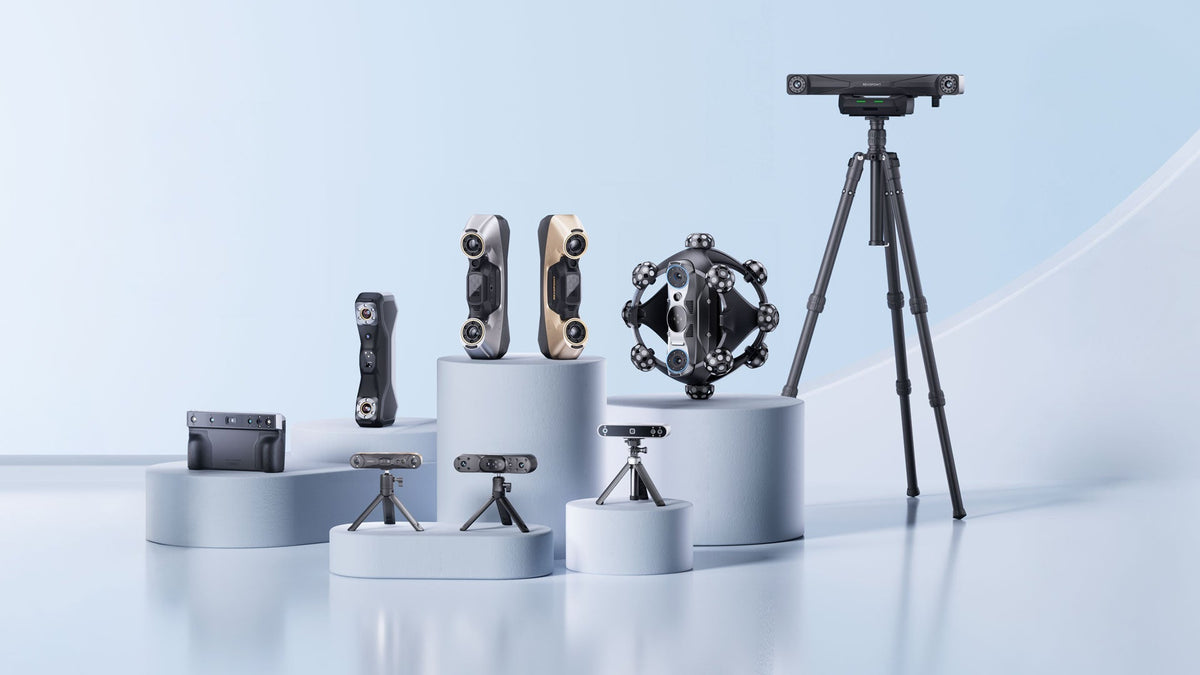
For smaller mechanical components and detailed geometries, Daniele uses the Revopoint POP 4 and MetroY Pro. When mobility and flexibility are more important, he uses MIRACO, a standalone 3D scanner that allows scanning and processing without being tethered to a computer.
This flexibility is important in repair environments, where technicians may need to work directly around equipment rather than bring the equipment into a dedicated scanning setup.
The goal is not simply to create a 3D model.
It is to create usable engineering data that can lead to a physical solution.

Four Practical Applications of 3D Scanning in Medical Equipment Repair
1. Custom Disassembly Tools
One of the most direct applications is creating tools that do not already exist.
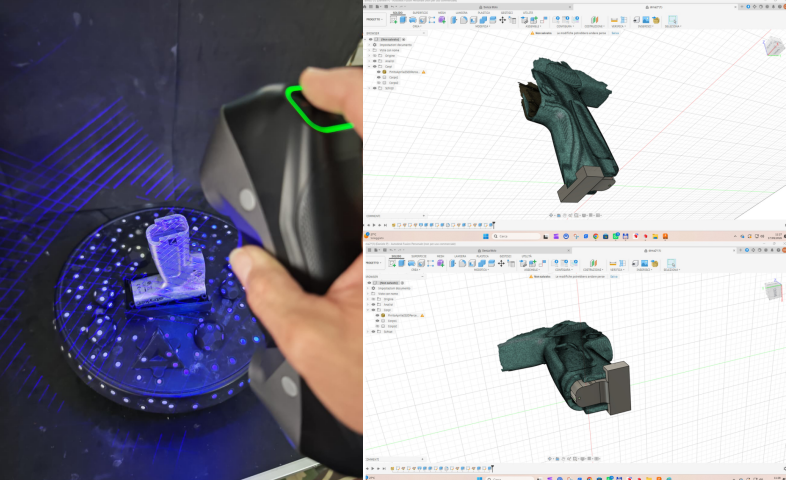
During the repair of an endoscopic camera, Daniele needed a custom fixture that could follow the camera's complex exterior while applying controlled force at specific points. The tool needed to hold the camera securely without scratching or damaging its housing.
Using the MetroY Pro in laser scanning mode, he captured the camera's geometry and brought the scan into Fusion 360. The fixture was then designed around the actual shape of the equipment and 3D printed for testing.

For this type of application, the ability to capture difficult surfaces is particularly useful. MetroY Pro combines blue laser and structured-light scanning and can capture dark or shiny surfaces without scanning spray. It provides volumetric accuracy of up to 0.02 mm and supports scan-to-CAD and reverse-engineering workflows.

The result was not simply a digital replica of the camera.
It was a functional repair tool designed from the camera's real geometry.
2. Reverse Engineering Replacement Parts
A similar approach can be used when an original replacement component is unavailable or its design data no longer exists.
Instead of rebuilding a part from a limited set of measurements, technicians can scan the existing component and use its geometry as a reference for CAD reconstruction.
This is particularly useful for legacy equipment, customized components, and parts that need to interface precisely with surrounding hardware. Reverse engineering with 3D scanning is already used across engineering applications for legacy part recreation, tooling, custom-fit components, and replacement parts.

For smaller and more detailed mechanical components, Daniele uses the MetroY Pro.
Its blue laser scanning system is designed for high-detail capture, with dedicated laser modes for different geometric features. With an accuracy of up to 0.02 mm, MetroY Pro can capture fine edges, deep holes, and complex mechanical details—useful when small dimensional differences can affect how a replacement component fits or functions.
The workflow becomes:
Physical Part → 3D Scan → CAD → Prototype → Test → Final Part
The scan does not replace engineering judgment. It gives the engineer a much stronger geometric starting point.
3. Custom Fixtures, Supports, and Adapters
Not every repair requires a replacement component.
Sometimes the solution is a fixture, support, adapter, alignment tool, or temporary holding device designed specifically for the equipment being repaired.
These parts need to fit the real object—not an idealized approximation.
A fixture that is too loose may fail to hold the equipment securely. One that is too tight can create unwanted pressure or interfere with surrounding components.
Starting with a 3D scan allows technicians to design around the actual geometry of the equipment, including complex curves and interfaces that are difficult to capture with conventional measuring tools.
The result is a more direct path from physical geometry to functional design.

4. Legacy Equipment and Missing CAD Data
Many repair challenges begin with missing information.
Equipment may be decades old. Original drawings may be incomplete. CAD files may never have existed. Previous modifications may also mean that the physical equipment no longer matches its original documentation.
In these situations, the physical object can become the most reliable reference.
3D scanning provides a way to bring that physical geometry back into a digital workflow—creating data that can be used for reverse engineering, documentation, redesign, or manufacturing.
This is especially relevant to repair and refurbishment, where the goal is often not to reproduce an original design exactly, but to create a solution that works with the equipment as it exists today.

Choosing the Right 3D Scanner for the Repair
Different repair problems call for different scanning approaches.
For Daniele, the choice depends mainly on the size of the object, its geometry, its surface characteristics, and where the work needs to be performed.
POP 4 provides a flexible hybrid scanning workflow for small-to-medium objects. Its blue laser mode is useful for complex or challenging surfaces, while its wireless connectivity makes it practical when the equipment needs to be scanned directly in the repair environment.
MetroY Pro is better suited to smaller mechanical components where fine geometric detail and high precision are priorities. Its blue laser technology and multiple scanning modes allow technicians to capture edges, holes, and other detailed features needed for reverse engineering.
MIRACO takes a different approach. As a standalone scanner, it combines scanning, processing, and viewing in one device, allowing technicians to work without a computer connection. Its Near and Far scanning modes also allow it to cover objects of different sizes, making it particularly useful when mobility and flexibility are priorities.
The important point is that there is no single “best” scanner for every repair.
The right tool is the one that fits the geometry, accuracy requirements, material, and working environment of the job. And if you’re ready to upgrade your workflow, use discount code REVONEWS26 at checkout to enjoy an extra 2–5% off your order.
Accuracy That Matters Beyond the Specification Sheet
In medical equipment repair, accuracy is ultimately about function.
A custom fixture needs to fit securely. A replacement component needs to interface correctly with surrounding parts. A disassembly tool needs to apply force where intended without damaging the equipment.
For Daniele, tolerances of even a few tenths of a millimeter can matter depending on the application.

But the practical question is not simply whether a scanner can achieve a particular number.
It is whether the resulting digital geometry is accurate enough to reduce approximation and produce a solution that works on the real equipment.
That is where 3D scanning can make a difference.
Better geometry → fewer assumptions → fewer iterations → faster functional solutions.
From Saving Time to Expanding Repair Capabilities
The time savings can be significant.
According to Daniele, tasks that could previously take several days can often be completed within hours when 3D scanning is incorporated into the workflow.
But the bigger benefit goes beyond speed.
3D scanning can expand what a repair technician is able to build.
A custom disassembly tool can make a difficult repair possible.
A scanned component can become the foundation for a replacement part.
A custom fixture can be designed around equipment with no standard support.
A legacy component can be brought back into a modern digital workflow.

For repair businesses, these capabilities can mean taking on problems that might otherwise be difficult or impractical to solve with standard tools alone.
They can also help reduce dependence on incomplete documentation, minimize prototype iterations, and build more confidence when developing a custom solution.
“For me, the real value of the scanner is not simply in creating a 3D model. Its value comes from how that digital model can be integrated into the entire workflow and transformed into something useful: a tool that makes a repair possible, a component that solves a problem or a solution that ultimately helps us return fully functional equipment to the customer.”
3D Scanning as Part of the Modern Repair Workflow
For technical teams, 3D scanning is becoming less about simply measuring an object and more about capturing the geometry needed to engineer a solution.
The workflow connects the physical and digital worlds:
Real Equipment → 3D Scan → CAD → 3D Print → Test → Refine → Repair
That shift changes the question from:
“How do I measure this?”
to:
“How can I use the geometry of this equipment to build the solution I need?”
As Daniele puts it:
“3D scanning is no longer just a way to capture an object: it has become an essential part of the entire process.”
And when the right tool, replacement part, or engineering data does not exist, the geometry of the equipment itself can become the starting point for creating one.

FAQ: 3D Scanning for Medical Equipment Repair
How is 3D scanning used in medical equipment repair?
3D scanning captures the geometry of real equipment and brings it into a digital workflow. The scan can then be used as a reference for CAD design, custom tools, fixtures, or replacement parts.
A typical workflow is:
Equipment → 3D Scan → CAD → Prototype → Test → Repair
Can 3D scanning be used to reverse engineer medical equipment parts?
Yes. When original CAD data or replacement parts are unavailable, a 3D scan can provide the geometric reference needed to recreate or redesign a component.
The scan does not replace engineering expertise, but it reduces the need to reconstruct complex shapes from manual measurements alone.
Can 3D scanning help create custom tools for medical equipment repair?
Yes. A scan can be used to design custom disassembly tools, fixtures, supports, or other interfaces that match the actual geometry of the equipment.
This is especially useful when a standard tool is unavailable or when a repair requires a solution designed for a specific component.
How accurate does a 3D scan need to be for repair applications?
The required accuracy depends on the component and its function. For custom tools and fixtures, the scan must be accurate enough to ensure a secure fit without creating unwanted pressure or damaging the equipment.
In Daniele's workflow, tolerances of a few tenths of a millimeter can make a meaningful difference depending on the application.
Which 3D scanner is suitable for medical equipment repair?
The right scanner depends on the size, geometry, and material of the component.
POP 4 can be used for compact components and complex surfaces.
MetroY Pro is suited to detailed mechanical geometry and difficult features.
MIRACO provides a standalone and flexible workflow for scanning different object sizes.
For professional repair workflows, different scanners can complement each other rather than serving as direct alternatives. Use discount code REVONEWS26 at checkout to enjoy an extra 2–5% off your order.
What are the main benefits of 3D scanning in equipment repair?
The main benefit is not simply faster measurement. 3D scanning provides a digital starting point based on the real geometry of the equipment.
Combined with CAD and 3D printing, it can help reduce manual reconstruction and prototype iterations while enabling custom solutions for repairs where standard tools or replacement parts are unavailable.

Hinterlasse einen Kommentar
Diese Website ist durch hCaptcha geschützt und es gelten die allgemeinen Geschäftsbedingungen und Datenschutzbestimmungen von hCaptcha.